
DT CLI
Manage Your Cloud Infrastructure from the TerminalManage your DT Cloud resources directly from the command line with DT CLI.
DT CLI
A Single Command-Line Interface for DT Cloud
DT CLI is the official command-line interface for managing your DT Cloud resources from the terminal.
Instead of switching between the Console and your terminal for daily cloud operations, perform the tasks you need directly from your working environment
WORKFLOWS
Turn Cloud Operations into Workflows
Go beyond running a single command with DT CLI. Combine commands to create repeatable operations and automated workflows.
Automate Repetitive Tasks
Move frequently performed cloud operations into shell scripts to reduce manual work.
Perform Bulk Operations
Include operations across multiple resources in a single workflow.
Integrate with Other Tools
Use DT CLI with your existing tools and scripts through JSON output.

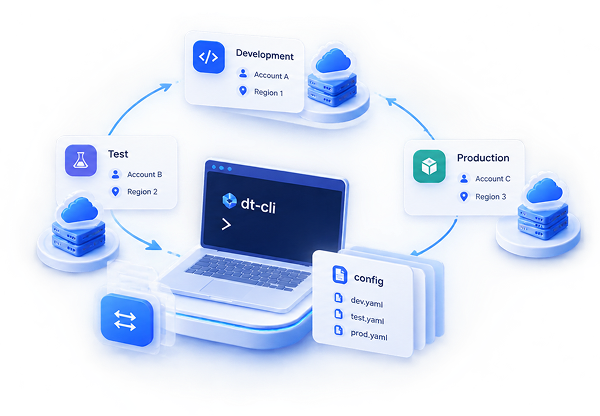
One Consistent Workflow Across Environments
Keep the same operational approach across development, testing, and production environments.
DT CLI allows you to work with multiple DT Cloud accounts and regions through different configuration files, making it easy to switch between projects.
Works in Your Preferred Environment
Use DT CLI in the environment you prefer.
| Linux | macOS | Windows | Docker |
Whether you work from your local terminal or a container-based development environment, access and manage your DT Cloud resources with ease.
USE CASES
Where Can You Use DT CLI?

Set Up Development Environments
Create and manage the cloud resources needed for development and testing directly from the command line.

Daily Infrastructure Operations
Perform daily operations on virtual machines, networks, volumes, and other resources from your terminal.

Kubernetes Operations
Integrate cluster and node group management into your existing operational workflows.

Network and Security Management
Manage your network, router, load balancer, security group, and VPN configurations from the terminal.

Bulk Resource Management
Manage operations across multiple resources through scripts and automation processes.
Start Managing Your Cloud from the Terminal
Manage your DT Cloud resources, automate your operations, and make cloud infrastructure a natural part of your development workflows.
Frequently Asked Questions
Do you have any question?
DT CLI (dtctl) is the official command-line interface for managing DT Cloud resources from the command line.
You can manage core DT Cloud resources such as virtual machines, networks, subnets, routers, Elastic IPs, security groups, volumes, snapshots, images, SSH keys, Kubernetes, load balancers, VPNs, backups, and backup plans.
Not necessarily. DT CLI and the DT Cloud Console complement each other. While the Console provides a visual management experience, DT CLI is designed for terminal-based operations, scripts, and automation.
Yes. You can use commands in shell scripts to automate your cloud operations.
Yes. DT CLI provides output in JSON format for integration with automation workflows and other command-line tools.
DT CLI runs on Linux, macOS, and Windows, supporting both Intel and ARM-based systems. It can also be run in Docker environments.
Yes. DT CLI is open source under the Apache 2.0 license, and its source code is available on GitHub.
For more information, please fill out the form and we will call you.
Keep up with the age with artificial intelligence technologies!
Reserve your spot for NVDIA H100 and A100 processors and catch up with AI technologies!
Reserve your Spot

-
Subscribe to our newsletter to be informed about innovations in the cloud world.

Copyright ©2025 DT. All Rights Reserved.
Subscribe to our newsletter to be informed about innovations in the cloud world.
Copyright ©2025 DT. All Rights Reserved.